
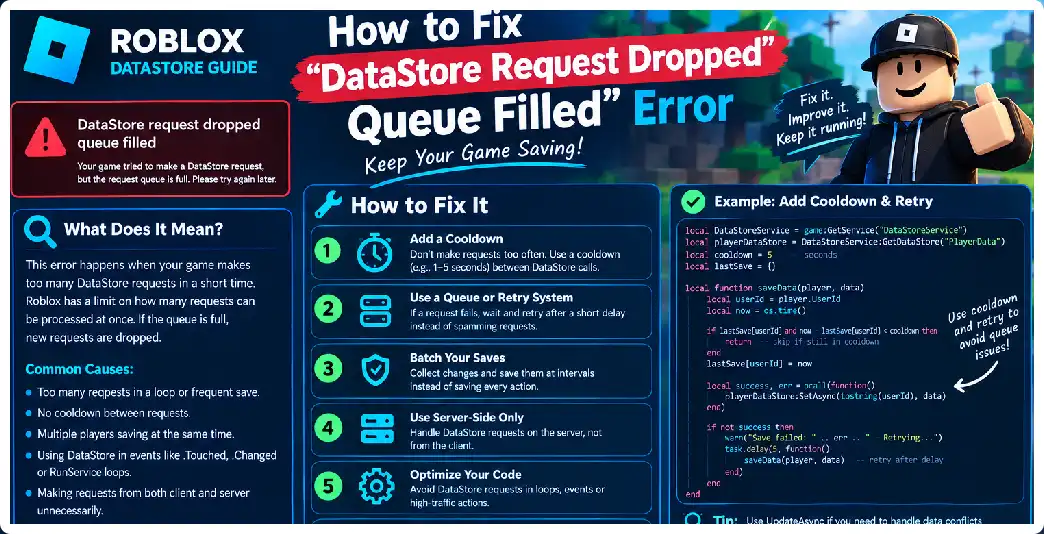
The “DataStore request dropped: request was throttled but queue was full” error is one of the most common signs that a Roblox experience is sending DataStore requests faster than the available DataStore budget can process them. It can appear with operations such as GetAsync(), SetAsync(), UpdateAsync(), IncrementAsync(), RemoveAsync(), and related DataStore operations. The important point is that the error usually does not mean that your DataStore itself has disappeared or that the player’s data is automatically corrupted. It means Roblox temporarily throttled requests, placed them into an internal queue, and eventually had to drop a request because that queue was full.
The correct solution is therefore not simply to add more pcall() calls or repeatedly retry the same operation. A retry system can actually make the problem worse if it immediately sends another request while the original server is already overloaded. The durable solution is to reduce unnecessary DataStore traffic, avoid repeated writes, respect request budgets, organize saves efficiently, and use controlled retries with exponential backoff and jitter when a transient failure genuinely needs another attempt.
What Does “Request Dropped: Queue Filled” Mean?
Roblox DataStores have request limits and internal throttling mechanisms. When an experience exceeds the applicable throughput or request budget, Roblox can throttle new DataStore operations. Throttled requests may wait in queues, but each relevant queue has a finite capacity. Roblox currently documents a maximum queue size of 30 requests for these throttled DataStore request categories. When the queue reaches that limit, additional requests can fail with the corresponding throttle error rather than waiting indefinitely.
This means an error such as UpdateAsync request dropped. Request was throttled but queue was full. is fundamentally a request-volume and throttling problem. Your game is generating more work than the DataStore system can process at that moment. The problem can be caused by one large burst, many players joining or leaving simultaneously, excessive autosaving, repeated writes during gameplay, several scripts saving the same player, or a combination of these factors.
It is also important to understand that Roblox applies both experience-level and server-level limits. Standard DataStore requests have budgets that depend partly on the number of concurrent players, while individual servers also have their own request limits. UpdateAsync() is particularly important because a single UpdateAsync() operation consumes both a read and a write budget. Consequently, replacing every SetAsync() with UpdateAsync() without redesigning your save strategy can increase request pressure rather than reduce it.
The Most Common Cause: Saving Too Often
One of the biggest causes of queue-filled errors is saving player data whenever something changes. For example, a developer might call SetAsync() whenever a player earns one coin, purchases an item, receives experience, changes a setting, completes a quest, or modifies an inventory item. With enough gameplay activity, a single player can generate a surprisingly large number of DataStore requests.
DataStores are intended for persistent information rather than every individual state change. A better architecture keeps the player’s current data in server memory during the session and periodically persists the accumulated state. When the player earns currency, the server changes the in-memory value immediately. The DataStore is then updated at controlled intervals or at important lifecycle points rather than after every individual event.
For example, avoid this pattern:
Coins.Changed:Connect(function()
    DataStore:SetAsync("Player_" .. player.UserId, Coins.Value)
end)
If the player’s currency changes frequently, this can produce a large stream of write requests. A better approach is to mark the player’s data as dirty and let a controlled saving system persist it later.
local dirtyPlayers = {}

local function markDirty(player)
    dirtyPlayers[player] = true
end

-- Change gameplay data
playerData.Coins += 10
markDirty(player)
A separate save loop can then process dirty players at controlled intervals. This separates gameplay state changes from persistent storage operations, which is one of the most important architectural improvements for avoiding DataStore pressure. Roblox recommends controlling request frequency and using techniques such as jitter to avoid synchronized traffic spikes.
Do Not Save Every Frame
A particularly serious mistake is putting a DataStore operation inside a loop that runs very frequently. DataStores should never be treated like a frame-by-frame database. Code running through RunService.Heartbeat, RenderStepped, or another high-frequency loop can accidentally generate enormous request volumes if a DataStore call is placed inside it.
For example, this is fundamentally unsafe:
while true do
    task.wait(1)
    playerDataStore:SetAsync(key, data)
end
Even if one save per second sounds reasonable during testing, multiplying that behavior across many players and servers can create substantial traffic. The problem becomes much worse if another script performs additional saves at the same time. Roblox’s request budgets are shared according to the applicable request categories, so independent scripts do not receive completely separate unlimited quotas.
Instead, save at deliberate intervals and only save data that actually needs persistence.
local SAVE_INTERVAL = 120

while task.wait(SAVE_INTERVAL) do
    for player, data in pairs(activeProfiles) do
        if data.Dirty then
            savePlayerData(player, data)
        end
    end
end
The exact interval should depend on the game and its acceptable progress-loss window. The important principle is that saving should be controlled rather than continuously triggered by every gameplay event.
Check Your DataStore Request Budget
Roblox provides APIs that allow developers to inspect the available request budget for different DataStore request types. This is extremely useful when diagnosing queue-related problems because it lets you determine whether your server is consuming requests faster than the available budget is replenishing.
For example:
local DataStoreService = game:GetService("DataStoreService")

local budget = DataStoreService:GetRequestBudgetForRequestType(
    Enum.DataStoreRequestType.StandardWrite
)

print("Available write budget:", budget)
You can inspect read and write budgets separately.
local readBudget = DataStoreService:GetRequestBudgetForRequestType(
    Enum.DataStoreRequestType.StandardRead
)

local writeBudget = DataStoreService:GetRequestBudgetForRequestType(
    Enum.DataStoreRequestType.StandardWrite
)

print("Read:", readBudget)
print("Write:", writeBudget)
Monitoring these values while players join, leave, trade, purchase items, and otherwise modify data can help identify exactly when your game starts consuming excessive DataStore capacity. Roblox also provides configurable request-rate controls and recommends using request budgets when managing DataStore usage.
Use One Central Save System
Another frequent cause of queue problems is having many scripts independently write to the same player’s DataStore. An inventory script might save inventory data, a currency script might save coins, a quest script might save quests, and a settings script might save preferences. If all of them operate independently, one player leaving could trigger several DataStore calls at almost the same time.
A cleaner architecture uses one authoritative player-data manager.
ServerScriptService
    PlayerData
        PlayerDataService
        PlayerDataSchema
        SaveService
        LoadService
Other gameplay systems modify the player’s server-side data rather than directly calling the DataStore.
PlayerDataService:AddCoins(player, 100)
PlayerDataService:AddItem(player, "Potion", 2)
PlayerDataService:SetQuestProgress(player, "Quest1", 50)
The save system later serializes the complete state and performs the necessary DataStore operation. This greatly simplifies concurrency, validation, retries, and shutdown handling. Persistent player data should remain server-controlled because DataStore access is server-side and clients should not be trusted with authoritative persistent information.
Prefer UpdateAsync When Appropriate
UpdateAsync() is often preferable when the new value depends on the existing stored value or when multiple servers could modify the same key. It obtains the current value and lets your callback calculate the replacement value. This reduces certain forms of lost updates compared with blindly overwriting the key using SetAsync().
A basic example is:
local success, result = pcall(function()
    return playerStore:UpdateAsync(key, function(oldData)
        oldData = oldData or {}

        oldData.Coins = 100

        return oldData
    end)
end)
However, UpdateAsync() is not a magic solution for queue-filled errors. Roblox documents that UpdateAsync() consumes both read and write budgets. If your game is already making too many requests, simply changing every SetAsync() into UpdateAsync() can increase pressure on the request system.
The goal should therefore be fewer, better-controlled persistence operations, while choosing UpdateAsync() where its consistency characteristics are actually useful.
Add Controlled Retries
DataStore operations can fail temporarily, so production systems should normally wrap network calls with pcall(). However, retrying immediately and repeatedly is a mistake. Official guidance recommends exponential backoff with random jitter for transient failures.
A simple retry helper can look like this:
local function retry(operation, attempts)
    local delayTime = 1

    for attempt = 1, attempts do
        local success, result = pcall(operation)

        if success then
            return true, result
        end

        if attempt < attempts then
            local jitter = math.random() * 0.5
            task.wait(delayTime + jitter)
            delayTime = math.min(delayTime * 2, 10)
        end
    end

    return false, nil
end
The important detail is that retries should be limited. A failed request should not create an endless chain of new requests. Roblox also warns that an unsuccessful call can have an uncertain outcome, meaning a request may have reached the backend even if your server did not receive a successful response. Therefore, retrying writes requires careful consideration of ordering and idempotency.
Why Immediate Retry Can Make the Error Worse
Imagine your server has already generated 30 queued write requests. One request fails, and your code immediately retries it ten times. Those ten retries are now additional requests competing with the original backlog. If many players do this simultaneously, the queue can fill even faster.
Instead of:
for i = 1, 10 do
    pcall(function()
        store:SetAsync(key, data)
    end)
end
use a bounded retry strategy with increasing delays. Even better, reduce the number of initial requests so that retry logic is needed only for genuine transient failures.
Avoid Synchronized Autosaves
Suppose every server starts an autosave loop at exactly 120 seconds:
while true do
    task.wait(120)
    saveEveryone()
end
If many servers started around similar times, their saves can become synchronized. This can create bursts of traffic rather than evenly distributed traffic. Random jitter can spread the work over time. Official guidance specifically recommends bounded random jitter for recurring operations that do not require exact timing.
For example:
local baseInterval = 120
local jitter = math.random(0, 20)

task.wait(baseInterval + jitter)
The same principle can be used when scheduling individual saves.
Handle PlayerRemoving Carefully
A common mistake is assuming that PlayerRemoving gives you unlimited time to perform a large number of independent DataStore operations. If one player leaves, your save system should perform one controlled save of that player’s authoritative state rather than triggering separate writes for every individual property.
For example, instead of:
PlayerRemoving:Connect(function(player)
    saveCoins(player)
    saveInventory(player)
    saveSettings(player)
    saveQuests(player)
    saveStatistics(player)
end)
prefer a unified operation:
PlayerRemoving:Connect(function(player)
    saveCompletePlayerData(player)
end)
The resulting stored record can contain the relevant data together.
{
    Coins = 1500,
    Level = 12,
    Inventory = {
        Potion = 5,
        Sword = 1
    },
    Settings = {
        Music = true
    }
}
The exact schema depends on your game, but consolidating related persistent data can dramatically simplify saving.
Use BindToClose Correctly
Servers can shut down, so a robust persistence system also needs shutdown handling. A common pattern is to save active players during BindToClose(), while ensuring that the save system does not generate unnecessary independent requests for each individual piece of data.
Example:
game:BindToClose(function()
    for player, data in pairs(activeProfiles) do
        savePlayerData(player, data)
    end
end)
In a real production system, you should coordinate these operations carefully, limit concurrency where appropriate, handle failures, and avoid creating a new uncontrolled retry storm during shutdown.
Don’t Confuse DataStoreService With MemoryStoreService
DataStores are intended for persistent information such as player progress and inventory. Memory stores are intended for temporary, high-throughput information that does not need permanent persistence, such as matchmaking queues or rapidly changing cross-server state.
If you are using DataStoreService for something that changes extremely frequently and does not need to survive indefinitely, reconsider whether that information belongs there. A temporary matchmaking queue, server coordination state, or rapidly changing cross-server value may be more appropriate for a service designed for temporary high-frequency workloads.
This does not mean that moving everything to MemoryStoreService fixes DataStore problems. Persistent player data still belongs in a persistent storage system. The key is matching the service to the type and lifetime of the information.
Check for Duplicate Save Systems
If you are experiencing queue-filled errors unexpectedly, search your entire project for:
SetAsync
UpdateAsync
IncrementAsync
GetAsync
RemoveAsync
Then identify every script that calls them.
You may discover that one player is being loaded by multiple scripts, saved by multiple scripts, or periodically autosaved by several independent systems. Roblox’s DataStore limits apply to the relevant request types, so the combined behavior of your scripts matters.
A particularly dangerous pattern is:
InventoryScript → Save
CurrencyScript → Save
QuestScript → Save
SettingsScript → Save
CombatScript → Save
PlayerScript → Save
Replace this with:
InventoryScript ─┐
CurrencyScript ──┤
QuestScript ─────┤
SettingsScript ──┼→ PlayerDataService → SaveService → DataStore
CombatScript ────┘
This gives you one place to control request frequency.
Check Whether You Are Writing the Same Key Too Frequently
Roblox documents throughput limits at the key level as well as broader DataStore request limits. If one key receives a very high volume of traffic, that key can become a bottleneck. Roblox recommends reducing unnecessary requests first and, when a logical record genuinely exceeds a key’s limits, considering deterministic sharding.
For normal player data, you should not immediately jump to sharding. First determine why the key receives so many requests. A player profile that is saved once every couple of minutes is very different from a profile being updated hundreds of times per minute. Only after reducing unnecessary traffic should you consider whether the data itself requires a more advanced storage design.
Do Not Send DataStore Requests From LocalScripts
Persistent DataStore access belongs on the server. Clients should communicate their requested actions to the server, and the server should validate and update persistent state. This prevents clients from directly controlling stored data and is essential for security.
A secure structure looks like:
LocalScript
    ↓
RemoteEvent
    ↓
Server Script
    ↓
Validate request
    ↓
Modify server data
    ↓
Mark data dirty
    ↓
SaveService
    ↓
DataStore
For example, a client can request:
PurchaseItem:FireServer("Potion")
The server should determine whether the player actually has enough currency and whether the item exists. It should not simply accept a client-supplied new balance and write it into the DataStore. Client-provided data must be validated because malicious clients can send arbitrary values or exploit race conditions around persistent data.
A Better Save Architecture
A practical production architecture can look like this:
ServerScriptService
│
├── PlayerDataService
│   ├── Load
│   ├── Get
│   ├── Modify
│   └── MarkDirty
│
├── SaveService
│   ├── SavePlayer
│   ├── SaveDirtyPlayers
│   ├── Retry
│   └── ShutdownSave
│
└── Gameplay Systems
    ├── Inventory
    ├── Currency
    ├── Quests
    └── Settings
Gameplay systems never call the DataStore directly. They modify the authoritative server-side profile. The save service controls when persistence happens. This reduces duplicated requests and makes the entire system much easier to debug.
Example of a Safer Save Function
A basic controlled save function could look like:
local DataStoreService = game:GetService("DataStoreService")

local store = DataStoreService:GetDataStore("PlayerData")

local function savePlayer(player, data)
    local key = "Player_" .. player.UserId

    local success, result = pcall(function()
        return store:UpdateAsync(key, function(oldData)
            return data
        end)
    end)

    if success then
        return true
    end

    warn("Save failed for", player.Name, result)
    return false
end
This example is intentionally simple. A production implementation should add validation, retry classification, backoff, dirty-state tracking, shutdown handling, and protections against stale or out-of-order saves. Official guidance recommends processing retries in order for each key because an older retry that executes after a newer successful write can potentially overwrite newer information.
How to Diagnose the Error Step by Step
Start by identifying the exact operation in the error message. If it says GetAsyncThrottle, investigate excessive reads. If it says SetAsyncThrottle, investigate writes. If it says UpdateAsyncThrottle, remember that UpdateAsync() consumes both read and write budgets. This distinction can immediately narrow down the source.
Next, search the entire project for every DataStore operation. Count how many scripts can execute each operation and identify whether they run during player join, gameplay, periodic autosaves, trading, purchases, player removal, and server shutdown. The goal is to build a complete map of DataStore traffic rather than debugging one line in isolation.
Then monitor request budgets while reproducing the problem. Look for sudden decreases in available budget and correlate them with gameplay events. If the budget falls rapidly whenever players join, your loading system may be responsible. If it falls during combat or inventory activity, gameplay-triggered persistence may be responsible.
Finally, inspect your retry behavior. If several scripts independently retry failed requests immediately, the retry system itself can contribute to the queue. Replace uncontrolled retries with bounded exponential backoff and jitter.
Quick Fix Checklist
If you need a practical checklist, work through these steps:
- Stop saving data every time a value changes.
- Keep active player data in server memory.
- Mark changed profiles as dirty.
- Save complete player state in controlled operations.
- Centralize DataStore access.
- Search for duplicate
SetAsync()andUpdateAsync()calls. - Monitor request budgets.
- Avoid DataStore calls inside high-frequency loops.
- Do not retry failed requests immediately.
- Use exponential backoff with jitter.
- Keep retries bounded.
- Process retries for the same key in order.
- Use
UpdateAsync()when concurrent updates require it. - Do not blindly replace every
SetAsync()withUpdateAsync(). - Validate all client-originated data on the server.
- Handle
PlayerRemoving. - Handle server shutdown.
- Avoid synchronized autosave bursts.
- Use the appropriate storage service for temporary versus persistent data.
- Investigate key-level hotspots before considering sharding.
Frequently Asked Questions
What causes “DataStore request dropped queue filled” in Roblox?
It occurs when DataStore requests are throttled and the applicable internal queue becomes full. The underlying cause is generally excessive request volume, insufficient available request budget for the current workload, or bursts of requests that exceed the service’s processing capacity.
Is the error caused by a Roblox Studio bug?
Not necessarily. Studio can have different DataStore testing limits, but the queue-filled error represents a real request-throttling condition. Production experiences can encounter the same class of problem when they generate excessive DataStore traffic.
Does adding pcall() fix the problem?
No. pcall() prevents a DataStore failure from crashing the surrounding code, but it does not reduce request volume or prevent throttling. You still need to redesign the request pattern and use controlled retries for transient failures.
Should I use UpdateAsync() instead of SetAsync()?
Use UpdateAsync() when you need to safely update data based on the existing value or when multiple servers may write the same key. However, UpdateAsync() consumes both read and write budgets, so replacing every write with UpdateAsync() is not a general cure for queue-filled errors.
Should I retry the request immediately?
No. Immediate repeated retries can increase request pressure. Use a limited retry count, exponential backoff, and random jitter for transient failures.
Can saving every minute cause the problem?
It can, particularly if many other DataStore requests are occurring at the same time or if every server performs its saves simultaneously. The appropriate save frequency depends on the game’s architecture and workload.
Should I save every time a player earns coins?
Generally, keeping the current value in server memory and persisting it through a controlled save system is more appropriate than performing a DataStore operation after every currency change.
Can exploiters cause DataStore problems?
An exploiter cannot directly access your persistent DataStore from a LocalScript, but they can send malicious requests to server remotes. If your server accepts those requests without validation, they can potentially trigger unauthorized data changes or excessive operations.
Is MemoryStoreService a replacement for DataStoreService?
No. DataStores are designed for persistent information, while memory stores are designed for temporary, frequently changing information. Choosing the correct service depends on whether the data must survive beyond its temporary lifetime.
How many requests can the DataStore queue hold?
Roblox currently documents a queue limit of 30 requests for each applicable throttled DataStore request queue. Once that queue is full, additional requests can be dropped with the relevant throttle error.
Can I simply increase the queue size?
The documented queue is part of the platform’s DataStore behavior. The practical solution is not to try to enlarge it but to reduce request pressure, respect budgets, and design the save system so requests are processed predictably.
What is the most important fix?
The most important fix is to stop treating DataStores as a real-time database for every gameplay event. Maintain authoritative data in server memory and persist it through a centralized, controlled saving system with appropriate retries and validation.
Final Takeaway
The DataStore request dropped: queue filled error is best understood as a symptom of excessive or poorly coordinated DataStore traffic. The queue is filling because requests are arriving faster than Roblox can process them under the applicable budgets and throughput limits.
The long-term solution is architectural: centralize player data, keep active state in server memory, reduce unnecessary reads and writes, save deliberately, monitor request budgets, use UpdateAsync() when its consistency benefits are needed, and handle transient failures with bounded exponential backoff and jitter.
Once those principles are implemented, queue-filled errors become much easier to prevent and diagnose, while your game’s persistence system becomes more reliable for players in the UK, USA, Canada, and other regions because the underlying DataStore architecture is not dependent on a particular country or client location.