
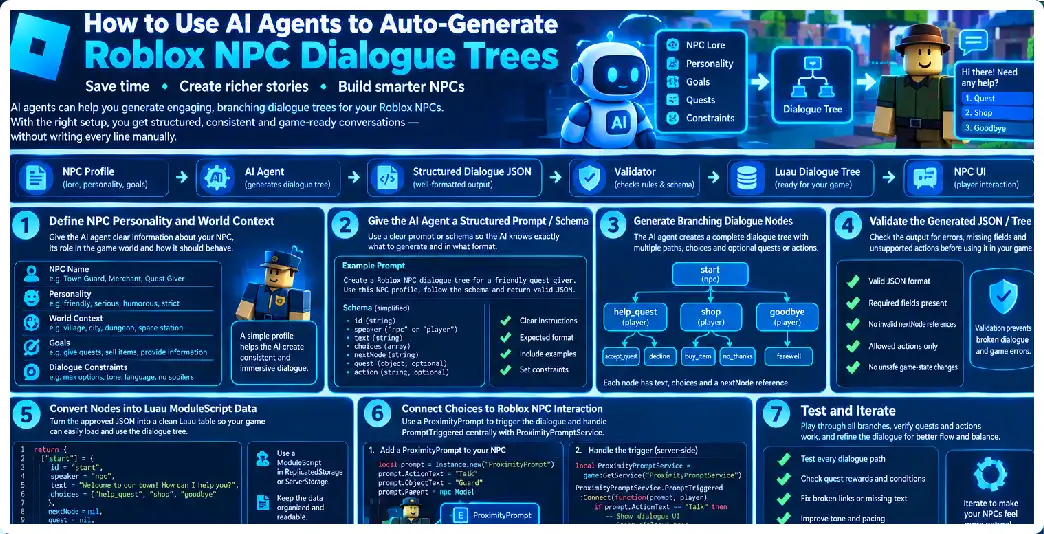
Creating believable NPC dialogue is one of the most time-consuming parts of building a story-driven Roblox experience. A single NPC may need greetings, questions, branching responses, quests, reactions to player choices, locked dialogue, repeat conversations, relationship changes, item checks, and multiple endings. Writing every branch manually can quickly become difficult to maintain, especially when a game contains dozens or hundreds of NPCs.
AI agents can be used to automate much of this process. Instead of asking an AI model to simply “write dialogue,” you can build an agent workflow that receives an NPC’s personality, role, location, quest information, world lore, player-state requirements, and desired conversation structure, then produces a structured dialogue tree that your Roblox game can load. Modern agent systems can use tools, structured outputs, validation, and multiple specialized agents, making them suitable for this type of content pipeline.
The most important idea is that AI should generate structured game data, not merely paragraphs of prose. A dialogue tree should have predictable node identifiers, response choices, conditions, actions, and transitions. Structured output mechanisms are specifically designed for producing data that software can inspect and validate rather than relying on free-form text.
For Roblox developers, this means an AI agent can become part of the content-production pipeline while Luau remains responsible for actually presenting the conversation, checking gameplay state, awarding rewards, and moving the player through the game. Roblox scripting supports dynamic game behavior, NPC behavior, events, and other gameplay systems through Luau.
What Is an AI-Generated Dialogue Tree?
A dialogue tree is a collection of connected conversation nodes. A node normally contains NPC dialogue and one or more player responses. Each response points toward another node or causes an action such as ending the conversation, starting a quest, giving an item, or changing a relationship value.
A simple tree might look like this:
NPC_GREETING
      |
      +-- "Who are you?"
      |       |
      |       v
      |   NPC_INTRO
      |
      +-- "Can you help me?"
      |       |
      |       v
      |   NPC_QUEST
      |
      +-- "Goodbye."
              |
              v
          END_DIALOGUE
An AI agent can generate this structure from a specification instead of requiring a developer to manually create every node. The important distinction is that the model should generate an explicit data structure containing relationships between nodes. Structured outputs allow applications to request a defined output type rather than relying on unconstrained prose.
Why Use AI Agents Instead of One AI Prompt?
A single prompt can generate dialogue, but it is not necessarily the best architecture for an automated production pipeline.
A better workflow separates responsibilities:
NPC Designer Agent
        |
        v
Story Agent
        |
        v
Dialogue Generator Agent
        |
        v
Logic Validator
        |
        v
Lore Validator
        |
        v
Roblox Exporter
Agent frameworks can support tools, structured outputs, guardrails, multiple agents, and orchestration. Multiple agents can therefore be used as specialized stages rather than forcing one model call to perform every task simultaneously.
For example, one agent can design the story while another checks whether the resulting tree has unreachable nodes. Another can inspect character voice, while a final validator checks that every response points to a valid destination.
The Core Architecture
A useful architecture is:
NPC Specification
       |
       v
AI Dialogue Planner
       |
       v
Structured JSON
       |
       v
Schema Validator
       |
       v
Dialogue Logic Validator
       |
       v
Roblox Dialogue Data
       |
       v
Luau Runtime
       |
       v
Player
This separation is important because the AI should not directly control critical gameplay systems. The AI generates proposed content and logic, while deterministic Roblox code decides what actually happens in the game.
Roblox’s client-server model is particularly important here. RemoteEvents allow communication between the client and server, while the server should remain the source of truth for gameplay decisions.
Step 1: Define Your NPC Specification
Before asking an AI agent to generate dialogue, create a structured NPC specification.
For example:
{
  "id": "blacksmith_mara",
  "name": "Mara",
  "role": "blacksmith",
  "personality": [
    "practical",
    "impatient",
    "helpful"
  ],
  "location": "North Village",
  "age_range": "adult",
  "speech_style": "short direct sentences",
  "story_role": "quest giver",
  "quest": "repair the village gate",
  "lore": [
    "The village was attacked recently.",
    "The eastern road is dangerous.",
    "Mara lost her brother during the attack."
  ]
}
This specification gives the AI controlled information from which to generate dialogue. Without a specification, the model has to invent personality, history, motivation, and world facts, which can result in inconsistent NPCs. Agent instructions and context are central parts of an agent’s configuration.
Step 2: Define the Dialogue Schema
Do not allow the model to return arbitrary dialogue text.
Instead, define a schema.
For example:
{
  "npcId": "blacksmith_mara",
  "startNode": "greeting",
  "nodes": [
    {
      "id": "greeting",
      "speaker": "npc",
      "text": "You look like you've come a long way.",
      "choices": [
        {
          "id": "ask_help",
          "text": "I need help.",
          "next": "quest_intro"
        },
        {
          "id": "ask_blacksmith",
          "text": "Are you the blacksmith?",
          "next": "blacksmith_intro"
        },
        {
          "id": "leave",
          "text": "Never mind.",
          "next": null
        }
      ]
    }
  ]
}
The advantage is that your Roblox code knows what to expect. Each node has an ID, dialogue text, choices, and destinations.
Structured agent outputs are designed for exactly this type of application-controlled result. An output schema can be validated rather than treating the model response as unrestricted text.
Step 3: Add Conditions
A useful dialogue system needs conditions.
For example:
{
  "id": "quest_offer",
  "text": "Have you brought the iron I requested?",
  "conditions": [
    {
      "type": "has_item",
      "item": "IronOre",
      "amount": 5
    }
  ],
  "choices": [
    {
      "text": "Yes.",
      "next": "complete_quest",
      "conditions": [
        {
          "type": "has_item",
          "item": "IronOre",
          "amount": 5
        }
      ]
    }
  ]
}
The AI should generate the condition specification, but the Roblox server should evaluate it.
This distinction is critical. The AI proposes:
has_item IronOre >= 5
The server determines whether the player actually has the required item.
Because the client cannot be trusted for authoritative gameplay state, sensitive game-state checks should be performed on the server. The client-server communication model is designed around server verification of gameplay actions.
Step 4: Define Actions
Dialogue can do more than display text.
A choice might:
StartQuest
GiveItem
RemoveItem
AddCurrency
SetFlag
IncreaseRelationship
TeleportPlayer
EndConversation
Instead of allowing AI-generated code to perform these actions directly, use declarative action objects.
For example:
{
  "action": {
    "type": "start_quest",
    "questId": "repair_village_gate"
  },
  "next": "quest_started"
}
Your Luau code can then recognize start_quest and invoke a trusted function.
The AI never needs permission to execute arbitrary Lua code.
Step 5: Build the AI Prompt
A strong generation prompt should define:
ROLE
You are a narrative dialogue designer.

TASK
Generate a branching NPC dialogue tree.

CHARACTER
...

WORLD LORE
...

QUEST
...

STYLE
...

RESTRICTIONS
...

OUTPUT
Return only the required structured dialogue schema.
The agent should also be told what it must not do.
For example:
Do not invent locations.
Do not invent items.
Do not invent quest IDs.
Do not create actions outside the allowed action list.
Do not reference characters absent from the supplied lore.
Do not create unreachable nodes.
Do not create circular dialogue unless explicitly requested.
The more explicit the contract, the easier it becomes to validate the result.
Step 6: Use an AI Agent With Structured Output
A modern agent can be configured with instructions, tools, output types, guardrails, and other runtime behavior. Structured output types allow the application to receive a predictable object rather than free-form prose.
A conceptual Python implementation could look like:
from pydantic import BaseModel
from agents import Agent, Runner


class Choice(BaseModel):
    id: str
    text: str
    next_node: str | None


class DialogueNode(BaseModel):
    id: str
    text: str
    choices: list[Choice]


class DialogueTree(BaseModel):
    npc_id: str
    start_node: str
    nodes: list[DialogueNode]


agent = Agent(
    name="Roblox Dialogue Generator",
    instructions="""
    Generate a Roblox NPC dialogue tree.
    Follow the supplied character and world specification.
    Never invent unsupported game objects.
    Return only the required structured dialogue data.
    """,
    output_type=DialogueTree
)
The exact implementation can vary, but the architectural principle is the same: make the AI return a structure your application can validate. Structured output validation is a supported agent pattern.
Step 7: Give the Agent Tools
AI agents become much more useful when they can inspect controlled game information.
For example, create tools such as:
get_npc_profile()
get_world_lore()
get_available_quests()
get_items()
get_locations()
get_existing_dialogue()
validate_dialogue()
An agent tool is a controlled function that an agent can call. Modern agent frameworks support function tools and tool schemas, allowing applications to expose specific capabilities instead of giving the model unrestricted access to the environment.
For example:
def get_quest(quest_id: str) -> str:
    """Return the approved quest definition."""
    ...
The agent can then use the function rather than inventing quest information.
Step 8: Create a Lore Agent
One useful architecture is a dedicated lore agent.
Its responsibility is not to write dialogue. Instead, it checks whether generated dialogue conforms to the game’s established world.
For example:
Dialogue Generator
        |
        v
Lore Validator
        |
        +-- Invalid character
        +-- Invalid location
        +-- Invalid item
        +-- Invalid timeline
        |
        v
Approved Dialogue
This resembles an evaluator workflow, where one agent generates an output and another evaluates it against defined criteria. Agent orchestration patterns support chaining agents and running evaluator-style loops.
Step 9: Create a Dialogue Logic Validator
The next validator should inspect the tree itself.
It should detect:
Missing node
Duplicate node ID
Invalid next node
Missing start node
Unreachable node
Impossible condition
Infinite loop
Empty dialogue
No exit
Too many choices
A simple graph validator can be deterministic.
def validate_tree(tree):
    ids = {node.id for node in tree.nodes}

    if tree.start_node not in ids:
        raise ValueError("Start node does not exist")

    for node in tree.nodes:
        for choice in node.choices:
            if choice.next_node is not None:
                if choice.next_node not in ids:
                    raise ValueError(
                        f"Invalid destination: {choice.next_node}"
                    )

    return True
This is an important principle: use deterministic code for deterministic validation.
Do not ask an AI to determine whether "quest_intro" exists when a normal set lookup can do it perfectly.
Step 10: Detect Unreachable Nodes
Suppose the AI generates:
greeting
  |
  +-- quest
  |
  +-- goodbye

secret_node
If nothing points to secret_node, the node is unreachable.
A graph traversal can detect this.
def reachable_nodes(tree):
    lookup = {node.id: node for node in tree.nodes}

    visited = set()
    stack = [tree.start_node]

    while stack:
        current = stack.pop()

        if current in visited:
            continue

        visited.add(current)

        node = lookup[current]

        for choice in node.choices:
            if choice.next_node:
                stack.append(choice.next_node)

    return visited
Then:
reachable = reachable_nodes(tree)
all_nodes = {node.id for node in tree.nodes}

unreachable = all_nodes - reachable
This kind of deterministic validation is faster and more reliable than asking an AI to manually inspect graph connectivity.
Step 11: Generate Multiple Dialogue Versions
One of the major benefits of AI is that you can generate several variants.
For example:
Version A
Friendly tone

Version B
Mysterious tone

Version C
Humorous tone

Version D
Serious tone
The same NPC specification can be used to produce multiple dialogue trees while keeping the underlying lore and gameplay rules unchanged.
This is particularly useful when designing large games where NPC conversations should feel distinct without requiring a writer to manually draft every first version.
Step 12: Use a Critic Agent
A critic agent can evaluate:
Character consistency
Naturalness
Pacing
Choice quality
Redundancy
Quest clarity
Lore consistency
Player agency
The critic should not directly overwrite the dialogue.
Instead:
Generator
   |
   v
Critic
   |
   v
Feedback
   |
   v
Generator
Agent orchestration documentation describes evaluator loops in which an agent produces an output and another evaluates it, with iteration until the output satisfies the criteria.
Step 13: Generate the Roblox Data
Once the tree passes validation, export it to a Roblox-friendly representation.
For example:
return {
    StartNode = "greeting",

    Nodes = {
        greeting = {
            Text = "You look like you've traveled far.",
            Choices = {
                {
                    Text = "Who are you?",
                    Next = "introduction",
                },
                {
                    Text = "Can you help me?",
                    Next = "quest_intro",
                },
                {
                    Text = "Goodbye.",
                    Next = nil,
                },
            },
        },

        introduction = {
            Text = "My name is Mara. I keep this forge running.",
            Choices = {
                {
                    Text = "What happened here?",
                    Next = "village_story",
                },
            },
        },
    },
}
The AI-generated JSON can be converted into Luau automatically.
Step 14: Store Dialogue as Data
Avoid putting hundreds of lines of dialogue directly inside your main NPC controller.
Instead, separate:
NPC Controller
Dialogue Runtime
Dialogue Data
For example:
ReplicatedStorage
    Dialogue
        Mara
            DialogueData
or use ModuleScripts for static dialogue definitions.
Attributes can also be useful for attaching custom metadata to Roblox instances. Attributes are custom properties defined by developers and can be used to represent metadata associated with objects.
Step 15: Trigger the Conversation
A ProximityPrompt is a convenient way to initiate NPC interaction.
Roblox provides ProximityPrompt specifically for interactions when a player approaches an object, and it supports keyboard, gamepad, and touchscreen interaction.
A simple NPC can contain:
NPC
 ├── Humanoid
 ├── HumanoidRootPart
 └── ProximityPrompt
The prompt can use:
ObjectText = "Mara"
ActionText = "Talk"
The conversation begins when the prompt is triggered.
Step 16: Centralize Prompt Handling
For a game with many NPCs, use a centralized ProximityPromptService listener rather than placing identical scripts inside every NPC.
The platform documentation specifically describes centralized prompt handling through ProximityPromptService.
Conceptually:
local ProximityPromptService =
    game:GetService("ProximityPromptService")

ProximityPromptService.PromptTriggered:Connect(
    function(prompt, player)
        -- Identify NPC
        -- Load dialogue
        -- Start conversation
    end
)
The prompt can contain an attribute such as:
DialogueId = "blacksmith_mara"
Your dialogue manager can use that identifier to select the appropriate tree.
Step 17: Keep Gameplay Logic Server-Side
The dialogue interface can be displayed on the client, but important game-state operations should be controlled by the server.
For example:
Client:
"I choose Give Me The Sword."

Server:
Does player meet requirements?

Server:
Yes.

Server:
Give sword.

Server:
Tell client to display next dialogue.
RemoteEvents provide the client-server communication mechanism for this kind of architecture. The server can receive requests from the client and remain authoritative over gameplay state.
Step 18: Dialogue UI
The client can display:
--------------------------------
MARA
--------------------------------

"You look like you've come a
long way."

[ Who are you? ]

[ Can you help me? ]

[ Goodbye ]
--------------------------------
The client does not need to know the entire game logic.
It only needs enough information to display the current node and choices.
When the player selects a choice:
DialogueRemote:FireServer(
    npcId,
    nodeId,
    choiceId
)
The server verifies that the requested NPC, node, and choice are valid.
Step 19: Never Trust the Client’s Choice
A malicious client could attempt:
choiceId = "give_legendary_sword"
even if that choice is not visible.
Therefore the server should verify:
NPC exists
Player is close enough
Conversation is active
Node exists
Choice exists
Choice belongs to node
Conditions are satisfied
Action is allowed
RemoteEvents are not an authorization mechanism by themselves. They provide communication, while the server must verify gameplay actions.
Step 20: Condition Evaluation
Create a deterministic condition evaluator:
local Conditions = {}

function Conditions.hasItem(player, itemName, amount)
    -- Server-side inventory lookup
end

function Conditions.hasQuest(player, questId)
    -- Server-side quest lookup
end

function Conditions.flagEquals(player, flag, value)
    -- Server-side flag lookup
end

return Conditions
The AI generates:
{
  "type": "has_item",
  "item": "IronOre",
  "amount": 5
}
The server interprets it.
This is much safer than allowing AI-generated Lua to execute.
Step 21: Use an Action Registry
Create a fixed set of allowed actions:
local Actions = {
    start_quest = function(player, data)
        -- trusted implementation
    end,

    give_item = function(player, data)
        -- trusted implementation
    end,

    set_flag = function(player, data)
        -- trusted implementation
    end,
}
Then:
local action = Actions[actionData.type]

if not action then
    return false
end

action(player, actionData)
The AI can request only registered actions.
Step 22: Avoid AI-Generated Luau
A tempting architecture is:
AI
 |
 v
Generate Luau
 |
 v
Execute Luau
Avoid making this the foundation of your game.
A better architecture is:
AI
 |
 v
Generate structured data
 |
 v
Validate
 |
 v
Trusted Luau runtime
The AI should describe what the dialogue should do rather than generating arbitrary executable code.
Step 23: Create an NPC Personality Template
A reusable NPC personality schema might contain:
{
  "personality": {
    "confidence": 0.8,
    "humor": 0.2,
    "formality": 0.4,
    "patience": 0.3,
    "honesty": 0.7
  }
}
You do not have to use numerical values, but structured personality traits can help produce consistency.
For example:
Confidence: High
Humor: Low
Formality: Medium
Patience: Low
Honesty: High
The generator can use these as constraints.
Step 24: Character Voice
A character should not sound like every other AI-generated NPC.
Define:
Vocabulary
Sentence length
Favorite expressions
Forbidden expressions
Humor style
Emotional range
Knowledge boundaries
Speech rhythm
The AI agent can use these instructions consistently across dialogue nodes.
Step 25: Knowledge Boundaries
One of the most important NPC design features is what the character does not know.
For example:
Mara knows:
- Village history
- Blacksmithing
- Recent attack

Mara does not know:
- Events beyond the northern mountains
- Secret identity of the villain
- Future quest outcomes
Give these boundaries to the AI.
Otherwise, an NPC may accidentally reveal information that should remain hidden.
Step 26: Prevent Lore Hallucinations
Create a world database:
{
  "characters": [],
  "locations": [],
  "items": [],
  "quests": [],
  "factions": [],
  "historical_events": []
}
The dialogue agent should only be allowed to reference approved entities.
A retrieval tool can provide relevant lore to the agent, while the final validator checks entity names against the canonical database.
Agent tools are specifically intended to allow controlled access to external information or functions.
Step 27: Generate Dialogue From Quest Data
Instead of:
Write a conversation for a blacksmith.
provide:
NPC:
Mara

Quest:
Repair the village gate.

Objective:
Collect five IronOre.

Reward:
150 Coins.

Failure:
Player has not collected enough ore.

Next stage:
Meet the village guard.
The AI can then generate dialogue around actual gameplay data.
This makes generated dialogue more tightly integrated with the game.
Step 28: Dynamic Dialogue Variants
You can also generate multiple variants for the same state.
For example:
First-time greeting
Returning-player greeting
Quest-active greeting
Quest-completed greeting
Player-low-health reaction
Player-high-reputation reaction
Night-time greeting
Festival greeting
Your dialogue system can select the correct branch using deterministic conditions.
The AI generates the content; the game determines which version is active.
Step 29: Time and World-State Conditions
Dialogue can depend on:
Quest state
Player reputation
Faction reputation
Inventory
Time
Location
World flags
Completed missions
Relationship level
For example:
{
  "condition": {
    "type": "world_flag",
    "flag": "village_gate_repaired",
    "equals": true
  }
}
This creates the foundation for reactive NPCs.
Step 30: Generate Dialogue in Batches
If your game contains 100 NPCs, do not manually run the agent for every character.
Create a batch pipeline:
NPC specifications
       |
       v
Queue
       |
       +--> NPC 001
       +--> NPC 002
       +--> NPC 003
       +--> NPC 004
       |
       v
Validation
       |
       v
Export
This also allows failed generations to be retried without restarting the entire process.
Step 31: Version Your Dialogue
Treat dialogue like code.
Use:
MaraDialogue_v1
MaraDialogue_v2
MaraDialogue_v3
or add:
{
  "dialogueVersion": 3
}
This makes it easier to determine which generated content is active.
Step 32: Use Human Approval
For important story conversations, AI should usually produce drafts rather than automatically publishing everything.
A useful pipeline is:
AI generation
      |
      v
Automated validation
      |
      v
Human review
      |
      v
Approved dialogue
      |
      v
Roblox deployment
AI agents can support human-in-the-loop workflows, and agent tooling can be configured around approval and validation processes.
Step 33: Automate Export
Once approved, the pipeline can convert:
dialogue.json
into:
DialogueData.lua
For example:
return {
    Id = "blacksmith_mara",
    Version = 3,

    Nodes = {
        greeting = {
            Text = "You look like you've traveled far.",
            Choices = {
                {
                    Id = "help",
                    Text = "I need help.",
                    Next = "quest_intro",
                },
            },
        },
    },
}
The generated file can then be placed into the appropriate project structure.
Step 34: External Roblox Integration
If you want an automated pipeline to communicate with Roblox resources outside Studio, Open Cloud provides REST APIs for Roblox resources. The platform documentation describes external scripts and tools as supported Open Cloud use cases.
This can support workflows such as:
AI Agent
   |
   v
Dialogue JSON
   |
   v
Validator
   |
   v
Deployment service
   |
   v
Roblox resource
However, automated deployment should be carefully permissioned. Open Cloud API keys support granular permissions, and resource scopes can restrict which resources a credential can access.
Step 35: Keep Deployment Separate From Generation
Do not let the generation agent automatically deploy production dialogue.
Use:
Generation
   |
Validation
   |
Approval
   |
Staging
   |
Testing
   |
Production
This creates a controlled publishing pipeline.
Step 36: Testing Generated Trees
Automated tests should include:
Start node exists
Every destination exists
Every node is reachable
Every node has valid text
Choice IDs are unique
Node IDs are unique
Conditions use allowed operators
Actions use allowed action types
Referenced items exist
Referenced quests exist
Referenced characters exist
You can also test gameplay scenarios.
For example:
Player has no IronOre
Player has 3 IronOre
Player has 5 IronOre
Quest already completed
Quest not started
Player has low reputation
Player has high reputation
Step 37: Testing Conversation Loops
Loops are not always bad.
A conversation may intentionally return to a previous node:
Question
  |
  v
Answer
  |
  v
Question
But accidental loops can trap players.
Your validator should distinguish between permitted loops and unintended cycles.
Step 38: Measuring Dialogue Quality
Automated metrics can include:
Average nodes per tree
Average choices per node
Average text length
Number of validation failures
Number of lore violations
Number of unreachable nodes
Number of repeated phrases
You can also ask a critic agent to score internal criteria, but those scores should be treated as development signals rather than absolute measures of writing quality.
Evaluator-agent loops are useful for iterative refinement.
Step 39: Avoid Excessively Long NPC Responses
AI often produces longer dialogue than game interfaces can comfortably display.
Set constraints such as:
Maximum 2 sentences per NPC node
Maximum 18 words per sentence
Maximum 3 player choices
The exact limits depend on your UI.
The generator should be instructed to follow those constraints, and deterministic validation can reject text that exceeds them.
Step 40: Localization
If your Roblox game targets multiple languages, design localization into the data model from the beginning.
Instead of:
{
  "text": "Welcome to the village."
}
you can use:
{
  "textKey": "mara.greeting.001"
}
and maintain translations separately.
Roblox provides systems for in-experience text and UI, while a structured dialogue architecture makes it easier to separate dialogue identity from localized presentation.
Step 41: Avoid Generating Translations During Gameplay
For predictable performance and consistency, pre-generate or professionally review translations rather than asking an AI model to translate dialogue every time a player opens an NPC conversation.
The runtime should primarily select already-approved localized content.
Step 42: NPC Movement and Dialogue
Dialogue generation does not need to control NPC movement.
Keep responsibilities separate:
Dialogue System
    -> conversation

NPC Controller
    -> movement

Quest System
    -> quest state

Inventory System
    -> items

AI Dialogue Pipeline
    -> dialogue content
If an NPC needs to walk somewhere after dialogue, the dialogue can emit a declarative action such as:
{
  "type": "set_npc_state",
  "state": "go_to_gate"
}
The trusted NPC controller can interpret that state.
Roblox provides PathfindingService for finding logical paths around obstacles, so movement should remain part of the deterministic game system rather than being generated as arbitrary AI code.
Step 43: Recommended Overall Architecture
A scalable project can look like:
                 ┌───────────────────────┐
                 │ NPC Specifications    │
                 └───────────┬───────────┘
                             |
                             v
                 ┌───────────────────────┐
                 │ Dialogue Generator    │
                 │ Agent                 │
                 └───────────┬───────────┘
                             |
                             v
                 ┌───────────────────────┐
                 │ Structured JSON       │
                 └───────────┬───────────┘
                             |
              ┌──────────────┴──────────────┐
              v                             v
     ┌────────────────┐            ┌────────────────┐
     │ Schema         │            │ Lore Validator │
     │ Validator      │            │                │
     └────────┬───────┘            └───────┬────────┘
              └──────────────┬────────────┘
                             v
                 ┌───────────────────────┐
                 │ Dialogue Critic       │
                 └───────────┬───────────┘
                             |
                             v
                 ┌───────────────────────┐
                 │ Human Approval        │
                 └───────────┬───────────┘
                             |
                             v
                 ┌───────────────────────┐
                 │ Roblox Export         │
                 └───────────┬───────────┘
                             |
                             v
                 ┌───────────────────────┐
                 │ Luau Dialogue Runtime │
                 └───────────────────────┘
This architecture keeps creative generation separate from gameplay execution.
Frequently Asked Questions
Can AI generate an entire Roblox NPC dialogue tree?
Yes. The most reliable approach is to have an AI agent generate a structured dialogue representation containing nodes, choices, conditions, actions, and transitions rather than unrestricted prose. Structured agent outputs can be validated against a defined schema.
Can AI automatically create the Luau code?
It can generate Luau, but a safer architecture is to generate structured dialogue data and let trusted Luau systems execute predefined actions.
Can AI create quest branches?
Yes. You can provide the quest specification and ask the agent to create dialogue branches corresponding to quest states.
Can AI remember the NPC’s personality?
Yes, if personality information is supplied as persistent NPC context or retrieved through a controlled tool. Agent instructions and contextual information can guide the model’s behavior.
Can multiple AI agents work together?
Yes. Agents can be chained, used as tools, handed off, or orchestrated through application code.
Should one AI agent generate everything?
For small projects it can, but separating generation, validation, lore checking, and export generally gives you better control for larger projects.
Can an AI agent check its own dialogue?
Yes, but an independent validator or second agent can provide a stronger separation between generation and evaluation. Evaluator loops are a recognized agent orchestration pattern.
Should AI directly change Roblox gameplay?
For critical gameplay state, it is safer to let AI produce a structured request while trusted server-side Luau determines whether and how that request is executed.
Can NPC dialogue depend on inventory?
Yes. The dialogue tree can contain conditions such as has_item, while the Roblox server performs the actual inventory check.
Can NPCs have different conversations with different players?
Yes. Store player-specific progression, relationship, quest, or reputation state and use deterministic conditions to select appropriate branches.
Can AI generate thousands of NPC conversations?
Yes, an external generation pipeline can process many NPC specifications in batches. Large workloads should use queues, validation, retries, and versioning.
Can AI generate dialogue for UK, US, and Canadian players?
Yes. The architecture is applicable across those regions. You can also provide regional spelling, vocabulary, cultural context, or localization requirements as explicit generation constraints.
Should AI-generated dialogue automatically go live?
For production games, it is generally safer to use automated validation and a review or staging step before publishing important story content.
Can I connect AI generation to Roblox automatically?
Yes. An external application can generate and validate dialogue and can use supported cloud APIs for controlled Roblox resource workflows. Open Cloud provides REST APIs for external applications and tools.
Can I use ProximityPrompt to start AI-generated dialogue?
Yes. ProximityPrompt is designed for player interaction with objects and supports keyboard, gamepad, and touchscreen interaction.
Should the client decide whether a player completed a dialogue condition?
No. The client can request an action, but authoritative conditions such as inventory, currency, quest completion, and rewards should be verified by the server.
Final Recommendations
The strongest approach to AI-generated Roblox NPC dialogue is not to treat AI as a replacement for your dialogue system. Treat it as a content-generation and reasoning layer sitting above a deterministic game system.
Use AI agents for:
Character creation
Dialogue drafting
Branch generation
Quest conversation design
Alternative responses
Personality variation
Lore-aware writing
Dialogue critique
Content expansion
Localization drafts
Use deterministic Roblox code for:
Player state
Inventory
Currency
Quest completion
Rewards
Conditions
NPC interaction
Conversation state
Security
Gameplay actions
The combination is significantly more robust than allowing a model to generate and execute arbitrary game code.
The ideal pipeline is:
Design
   ↓
AI Generate
   ↓
Structured Output
   ↓
Schema Validation
   ↓
Lore Validation
   ↓
Logic Validation
   ↓
AI Critique
   ↓
Human Review
   ↓
Export
   ↓
Roblox Runtime
That architecture allows AI to handle the creative workload while Roblox remains responsible for the deterministic and authoritative parts of the game. Modern agent systems provide structured outputs, tools, guardrails, and multi-agent orchestration that fit naturally into this workflow.