
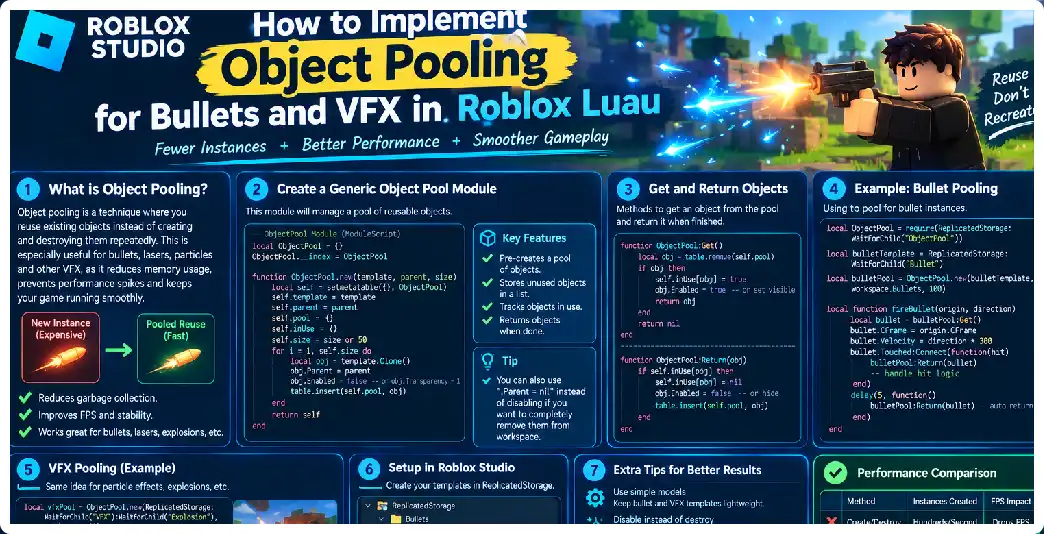
When a Roblox experience contains weapons, automatic guns, explosions, muzzle flashes, tracers, impact effects, shell casings, projectiles, or other rapidly repeating visual effects, creating and destroying Instances continuously can become an unnecessary source of runtime work. Object pooling provides a reusable architecture in which a fixed or expandable collection of objects is created ahead of time, temporarily activated when needed, and returned to an inactive state after use. This approach is particularly useful for games where the same type of object appears repeatedly during combat.
Object pooling is not a magic performance switch, and it should not be added simply because a game contains bullets. The important question is whether an experience repeatedly creates and destroys enough objects for allocation, hierarchy management, property changes, rendering, scripting, or garbage-related work to become measurable. Roblox recommends identifying actual performance problems, improving the relevant system, and monitoring the result rather than optimizing blindly.
For bullets and VFX, pooling is valuable because the lifecycle is predictable. A bullet becomes active, travels for a short period, hits something or reaches its lifetime, and then becomes inactive. A muzzle flash may remain visible for a fraction of a second before being disabled. An explosion may emit particles, play a sound, and then become available for another explosion. Instead of repeatedly constructing and destroying these objects, a pool can recycle them.
The fundamental concept is simple: Create once, activate many times, reset completely, and reuse. A pool normally contains an inactive collection and an active collection, or a table that tracks available objects and another mechanism that tracks objects currently in use. Luau tables are well suited to this because tables can act as arrays or dictionaries and can store Instances and other values.
Why Object Pooling Matters in Roblox
A conventional projectile system might execute Instance.new() whenever the player fires. When the bullet expires, the script may call Destroy(). This is easy to understand and can be perfectly acceptable for low-frequency weapons. The problem appears when the same process happens hundreds or thousands of times during intense combat. A weapon firing 20 rounds per second is already producing repeated lifecycle operations, while several players using automatic weapons can multiply that workload.
VFX can create an even more obvious workload. Consider muzzle flashes, shell effects, impact sparks, bullet trails, explosions, hit markers, smoke, magic projectiles, and ability effects. If every effect creates a new hierarchy containing several Parts, Attachments, ParticleEmitters, lights, sounds, and scripts, the amount of runtime Instance management can grow rapidly. Performance documentation specifically identifies excessive object density and frequent operations as areas worth investigating.
Pooling changes the lifecycle. Instead of:
Fire
    ↓
Create bullet
    ↓
Move bullet
    ↓
Hit target
    ↓
Destroy bullet
the pooled lifecycle becomes:
Pre-created bullet
    ↓
Acquire from pool
    ↓
Configure
    ↓
Move bullet
    ↓
Hit target
    ↓
Reset
    ↓
Return to pool
The same physical Instance can therefore participate in many firing cycles.
Pooling Is Not the Same as Hiding Objects
An important distinction is that an inactive pooled object should not behave like an active object. Simply moving hundreds of bullets far away while leaving their emitters, scripts, collision settings, and other systems active is not a complete pooling strategy.
A good pool has a clear inactive state. For a bullet represented by a Part, this might mean Parent = poolFolder, CanCollide = false, CanTouch = false, CanQuery = false, and Transparency = 1. For a VFX object, particle emission should be disabled and any associated effects should be reset. The exact reset requirements depend on the asset.
The reset operation is one of the most important parts of pooling. A reused object must not carry state from its previous activation. Otherwise, a bullet may inherit an old velocity, a VFX emitter may retain an old color or size, or a sound may continue playing unexpectedly.
Recommended Architecture
A scalable projectile system can be divided into several components:
Weapon
   ↓
Projectile Service
   ↓
Bullet Pool
   ↓
Projectile Simulation
   ↓
Raycast / Collision
   ↓
Impact Result
   ↓
VFX Pool
The weapon should request a projectile rather than directly constructing one. The projectile service controls acquisition, simulation, and release. The VFX system can use another pool for effects. This separation prevents individual weapons from developing their own incompatible lifecycle systems.
The architecture also makes it easier to change the number of bullets later. A shotgun, assault rifle, sniper rifle, rocket launcher, and enemy turret can all request objects from the same underlying pool infrastructure.
Building a Basic Object Pool
A simple pool can be represented by a Luau table.
local ObjectPool = {}
ObjectPool.__index = ObjectPool

function ObjectPool.new(template, initialSize, parent)
	local self = setmetatable({}, ObjectPool)

	self.Template = template
	self.Parent = parent
	self.Available = {}
	self.Active = {}

	for i = 1, initialSize do
		local object = template:Clone()
		object.Parent = parent
		object:SetAttribute("Pooled", true)

		table.insert(self.Available, object)
	end

	return self
end

function ObjectPool:Get()
	local object = table.remove(self.Available)

	if not object then
		object = self.Template:Clone()
		object.Parent = self.Parent
	end

	self.Active[object] = true

	return object
end

function ObjectPool:Release(object)
	if not self.Active[object] then
		return
	end

	self.Active[object] = nil

	table.insert(self.Available, object)
end

return ObjectPool
This design uses an array for available objects and a dictionary for active objects. Luau tables support both array-like and dictionary-like organization, making them useful for this type of resource manager.
The pool starts with an initial capacity. If the available list is empty, the example expands the pool by cloning another object. This is often more practical than allowing a weapon to fail when the pool temporarily reaches capacity.
Preallocation Versus Dynamic Expansion
There are two common strategies.
Fixed-size pool
A fixed pool creates a predetermined number of objects.
For example:
BulletPool.new(BulletTemplate, 100, workspace.Bullets)
If all 100 bullets are active, a new request may fail or use another policy.
This provides predictable memory usage, but the maximum capacity must be selected carefully.
Expandable pool
An expandable pool begins with a reasonable number of objects and creates additional objects only when the available list becomes empty.
This is generally more flexible because unusual bursts of activity do not immediately break the weapon system.
However, an expandable pool can grow indefinitely if there is no maximum. A better design can impose a ceiling.
self.MaximumSize = 250
Then:
if not object then
	if self.TotalCreated >= self.MaximumSize then
		return nil
	end

	object = self.Template:Clone()
	self.TotalCreated += 1
	object.Parent = self.Parent
end
This allows the developer to establish an explicit upper bound.
Designing a Bullet Pool
A bullet should normally be treated as a temporary simulation object rather than the authority for damage.
For example:
local BulletPool = ObjectPool.new(
	BulletTemplate,
	100,
	workspace.Projectiles
)
When firing:
local bullet = BulletPool:Get()

if not bullet then
	return
end

bullet.CFrame = CFrame.lookAt(origin, origin + direction)
bullet.Transparency = 0
bullet.CanQuery = false
bullet:SetAttribute("Active", true)
The bullet then becomes a visual representation of a projectile that is being simulated.
For many weapons, the actual projectile path can be calculated using raycasting rather than relying on a physical unanchored Part to determine the hit. This is especially important for fast projectiles because a visual bullet and the authoritative hit calculation do not necessarily need to be the same thing.
Server Authority and Client Effects
Multiplayer weapon systems need another architectural distinction: visual effects are not necessarily gameplay authority.
A client can request that it fired a weapon, but the server should validate critical gameplay information such as whether the player is allowed to fire, whether the weapon exists, whether the firing rate is plausible, and whether the resulting action is valid. Client-provided data should not automatically be trusted.
A secure architecture can therefore look like:
CLIENT
Input
  ↓
Request fire
  ↓
SERVER
Validate request
  ↓
Calculate / validate gameplay result
  ↓
Notify clients of visual effect
The server should remain the gatekeeper for important game state rather than simply relaying arbitrary client requests.
RemoteEvent Example
A weapon might use a RemoteEvent:
FireWeapon.OnServerEvent:Connect(function(player, origin, direction)
	-- Validate player, weapon, rate and input here.

	ProjectileService:Fire(
		player,
		origin,
		direction
	)
end)
The server should not blindly accept an arbitrary Instance supplied by the client or allow the client to dictate unrestricted game-state modifications. Remote input must be validated before it affects other players or persistent game state.
For purely cosmetic effects, the server may communicate a compact effect description to clients, while each client creates or activates its own local VFX pool. This can reduce unnecessary replication because effects such as flashes and explosions often do not need to exist as replicated gameplay objects on the server.
Building a Bullet Controller
The pool should manage object lifetime, while another system manages projectile simulation.
For example:
local RunService = game:GetService("RunService")

local activeBullets = {}

RunService.Heartbeat:Connect(function(deltaTime)
	for bullet, data in pairs(activeBullets) do
		data.Lifetime += deltaTime

		if data.Lifetime >= data.MaxLifetime then
			ReleaseBullet(bullet)
			continue
		end

		local oldPosition = data.Position
		local newPosition = oldPosition + data.Direction * data.Speed * deltaTime

		local result = workspace:Raycast(
			oldPosition,
			newPosition - oldPosition,
			data.RaycastParams
		)

		if result then
			HandleHit(data, result)
			ReleaseBullet(bullet)
		else
			data.Position = newPosition
			bullet.Position = newPosition
		end
	end
end)
Heartbeat runs every frame after physics simulation and provides a deltaTime value representing elapsed time since the previous frame. It is therefore suitable for many periodic gameplay updates, although expensive work should not be attached indiscriminately to frame-based events.
Do Not Create One Heartbeat Connection Per Bullet
One of the most common mistakes is to make every bullet create its own connection:
RunService.Heartbeat:Connect(function()
	-- update this bullet
end)
If 500 bullets are active, that can mean hundreds of callback connections.
A better architecture usually has one centralized update loop that iterates over active projectile data.
for bullet, data in pairs(activeBullets) do
	-- update bullet
end
This makes lifecycle management easier and avoids multiplying frame-based event connections. Roblox’s performance guidance specifically warns about expensive work attached to high-frequency frame events.
Store Simulation Data Separately
The Instance does not need to hold every piece of projectile state.
A table can contain:
local data = {
	Position = origin,
	Direction = direction,
	Speed = 500,
	Lifetime = 0,
	MaxLifetime = 3,
	Owner = player,
	RaycastParams = raycastParams,
}
Then:
activeBullets[bullet] = data
This separates the visual object from the simulation state.
The approach also makes it easier to release a bullet without destroying the data structure that manages the entire pool.
Releasing a Bullet Correctly
A release function should reset the bullet.
local function ReleaseBullet(bullet)
	local data = activeBullets[bullet]

	if not data then
		return
	end

	activeBullets[bullet] = nil

	bullet.Transparency = 1
	bullet.CanCollide = false
	bullet.CanTouch = false
	bullet.CanQuery = false

	BulletPool:Release(bullet)
end
The important concept is that ReleaseBullet() should be safe to call from multiple exit paths.
A bullet might expire because:
- it hits a target;
- it reaches maximum lifetime;
- the weapon is removed;
- the player leaves;
- the round ends;
- the projectile is cancelled;
- the pool is shutting down.
A centralized release function prevents inconsistent cleanup.
The Double-Release Problem
Pooling introduces a bug that ordinary Destroy()-based code sometimes hides: the same object can accidentally be released twice.
For example:
if hit then
	ReleaseBullet(bullet)
end

if lifetimeExpired then
	ReleaseBullet(bullet)
end
Both conditions might become true during the same update.
The pool should therefore verify ownership:
function ObjectPool:Release(object)
	if not self.Active[object] then
		return
	end

	self.Active[object] = nil
	table.insert(self.Available, object)
end
This makes release idempotent from the pool’s perspective.
Resetting VFX
VFX pooling is slightly more complicated because visual effects can contain stateful components.
A pooled effect may contain:
Explosion
├── Attachment
├── ParticleEmitter
├── ParticleEmitter
├── PointLight
├── Sound
└── other visual components
When the effect is reused, all relevant components need to be returned to a known state.
For particle emitters, you might reset properties and then emit a controlled burst:
local effect = VFXPool:Get()

effect:PivotTo(CFrame.new(position))

for _, emitter in effect:GetDescendants() do
	if emitter:IsA("ParticleEmitter") then
		emitter.Enabled = true
		emitter:Emit(emitter:GetAttribute("BurstCount") or 10)
	end
end
The exact implementation depends on whether the effect is continuous or burst-based.
Burst Effects
A burst effect is particularly suitable for pooling.
local function PlayExplosion(position)
	local effect = ExplosionPool:Get()

	if not effect then
		return
	end

	effect:PivotTo(CFrame.new(position))

	for _, object in effect:GetDescendants() do
		if object:IsA("ParticleEmitter") then
			object:Emit(20)
		end
	end

	task.delay(1.5, function()
		ExplosionPool:Release(effect)
	end)
end
The task library provides scheduling functions such as task.delay() and is preferred over legacy scheduling functions.
However, for a large-scale VFX system, it can be better to track effect lifetimes centrally instead of creating a separate delayed callback for every effect. This becomes especially useful when hundreds of effects can exist simultaneously.
A Better Centralized VFX Manager
You can store active VFX in a table:
local activeEffects = {}

local function PlayEffect(effect, position, lifetime)
	effect:PivotTo(CFrame.new(position))

	activeEffects[effect] = {
		Remaining = lifetime
	}
end
Then:
RunService.Heartbeat:Connect(function(dt)
	for effect, data in pairs(activeEffects) do
		data.Remaining -= dt

		if data.Remaining <= 0 then
			activeEffects[effect] = nil
			ResetEffect(effect)
			VFXPool:Release(effect)
		end
	end
end)
This provides one lifecycle manager instead of potentially creating large numbers of independent timers.
ParticleEmitter Performance
Pooling does not automatically make a particle-heavy effect cheap. Particle systems can still consume rendering resources, and performance guidance specifically notes that particles and property changes deserve attention when optimizing scenes.
For that reason, a good VFX pool should control not only the number of effect Instances but also the amount of visual work each effect performs.
For example, an explosion may be optimized by:
- limiting particle count;
- using short lifetimes;
- avoiding unnecessary emitters;
- avoiding excessive transparency layers;
- avoiding unnecessarily large textures;
- limiting simultaneous effects;
- using different quality levels for different devices.
The pool controls object reuse; the VFX design controls how expensive each active object is.
Pooling Bullet Tracers
Bullet tracers are another excellent pooling candidate.
Instead of creating a new tracer Part or beam every time a weapon fires, keep a collection of reusable tracer objects.
local tracer = TracerPool:Get()

tracer.Attachment0.WorldPosition = startPosition
tracer.Attachment1.WorldPosition = endPosition
tracer.Enabled = true
After the tracer has displayed:
tracer.Enabled = false
TracerPool:Release(tracer)
This avoids repeatedly creating the same visual hierarchy.
Pooling Muzzle Flashes
Muzzle flashes can be even simpler.
A weapon can have:
MuzzleFlashPool
    Flash01
    Flash02
    Flash03
    ...
When the weapon fires:
local flash = MuzzleFlashPool:Get()

flash:PivotTo(muzzle.CFrame)
flash.Enabled = true
After the effect finishes:
flash.Enabled = false
MuzzleFlashPool:Release(flash)
The same principle applies to magic attacks, sword trails, spell impacts, healing effects, smoke bursts, and environmental effects.
Pooling Should Not Mean Pooling Everything
Pooling every Instance in a game can make the code more complicated without improving performance.
A static decorative object that exists once does not need a pool. A menu element that is created once does not automatically need a pool. A projectile fired twice per minute may not need one either.
Pooling becomes most interesting when an object is:
- created frequently;
- destroyed frequently;
- structurally expensive;
- part of a high-frequency system;
- used in large bursts;
- repeatedly recreated with the same basic structure.
Roblox recommends measuring performance and identifying the actual source of the problem before deciding where optimization effort belongs.
Pooling and Memory
A pool deliberately keeps objects alive.
That means pooling can increase baseline memory usage because the inactive objects still exist.
This creates an important tradeoff:
Without pooling:
Lower idle object count
Higher creation/destruction activity

With pooling:
Higher idle object count
Lower repeated lifecycle activity
Therefore, an enormous pool can be counterproductive.
If a weapon normally uses 20 bullets simultaneously, creating 10,000 bullet Instances simply because the game might theoretically need them is usually not a sensible starting point.
A practical pool should be sized around observed concurrency.
Measuring Pool Size
Suppose testing shows that a particular weapon produces:
Average active bullets: 8
Typical peak: 25
Rare peak: 40
A starting pool size around the expected peak may be more appropriate than blindly allocating hundreds or thousands.
For an expandable pool, you can begin with 25 and allow it to grow up to a defined maximum.
local pool = ObjectPool.new(
	BulletTemplate,
	25,
	workspace.Projectiles
)

pool.MaximumSize = 50
This provides a controlled safety margin.
Avoid Deep Cloning During Combat
Performance guidance notes that complex table operations and deep cloning can become expensive, especially for large structures. Runtime systems should therefore avoid unnecessarily cloning large hierarchies every time an effect is triggered.
This is one reason pooling works well for repeated VFX. The hierarchy is cloned during setup rather than during every combat event.
If an explosion contains many objects, cloning it every time it occurs defeats much of the reason for using a pool.
One Pool Per Effect Type
A practical VFX architecture often uses separate pools:
local Pools = {
	MuzzleFlash = ObjectPool.new(MuzzleFlashTemplate, 20, VFXFolder),
	Explosion = ObjectPool.new(ExplosionTemplate, 30, VFXFolder),
	Impact = ObjectPool.new(ImpactTemplate, 50, VFXFolder),
	Tracer = ObjectPool.new(TracerTemplate, 100, VFXFolder),
	Smoke = ObjectPool.new(SmokeTemplate, 20, VFXFolder),
}
Then:
Pools.Explosion:Get()
Pools.Impact:Get()
Pools.Tracer:Get()
This is easier to reason about than one universal pool containing completely different object types.
Tags and Attributes
Attributes can help identify pooled objects.
object:SetAttribute("PoolType", "Bullet")
object:SetAttribute("Active", false)
Then:
object:SetAttribute("Active", true)
during acquisition and:
object:SetAttribute("Active", false)
during release.
Attributes are useful for debugging because Studio inspection can reveal whether an object is intended to be active or inactive.
Avoid Scripts Inside Every Bullet
A bullet does not necessarily need its own Script or LocalScript.
A centralized manager is often simpler:
ProjectileService
    ↓
Active projectile table
    ↓
One update loop
rather than:
Bullet 1 → Script → Heartbeat
Bullet 2 → Script → Heartbeat
Bullet 3 → Script → Heartbeat
...
The latter architecture can produce a large number of independently executing systems. High-frequency frame callbacks should be used thoughtfully because the scheduler must process them as part of the game’s runtime workload.
Client-Side VFX Pooling
For cosmetic VFX, a LocalScript can maintain a local pool.
For example:
local VFXPool = ObjectPool.new(
	ExplosionTemplate,
	30,
	workspace.ClientVFX
)
When the server reports an explosion:
ExplosionEvent.OnClientEvent:Connect(function(position)
	PlayExplosion(position)
end)
The client acquires the object and renders the effect locally.
This approach can reduce replication because cosmetic effects do not necessarily need to exist as replicated Instances for every player. The server can communicate the event while clients manage presentation.
Why the Server Should Not Create Every Cosmetic Bullet
If the game contains a purely visual tracer for every bullet fired by every player, creating every tracer on the server and replicating every visual object can create unnecessary network and replication work.
A more scalable architecture can be:
Server
  |
  | validated shot event
  ↓
Clients
  |
  +-- local tracer pool
  +-- local muzzle flash pool
  +-- local impact VFX pool
The actual damage and gameplay result remain authoritative, while clients handle presentation.
This follows the broader principle that the server does not need to replicate every visual detail when the visual does not affect game state.
Handling Missed Pool Capacity
What happens if all objects are active?
There are several policies.
Reject
local object = pool:Get()

if not object then
	return
end
This is appropriate for nonessential cosmetic effects.
Expand
Create another object up to a maximum.
Steal the oldest
For low-priority effects, the system can release an older effect and reuse it.
Degrade
Instead of rendering a complex explosion, display a cheaper effect.
This can be particularly useful for VFX because missing one decorative spark is usually preferable to allowing an uncontrolled number of expensive effects to accumulate.
Priority-Based VFX
You can assign effects priorities:
Impact = 1
MuzzleFlash = 2
Explosion = 5
SmallSpark = 10
Then, under pressure, lower-priority effects can be skipped.
The principle is simple:
Gameplay-critical
       ↓
Important visual
       ↓
Decorative visual
Object pooling therefore becomes part of a larger resource-management system rather than merely a cloning technique.
Pool Cleanup
A pool should also have a shutdown function.
function ObjectPool:Destroy()
	for object in pairs(self.Active) do
		object:Destroy()
	end

	for _, object in ipairs(self.Available) do
		object:Destroy()
	end

	table.clear(self.Active)
	table.clear(self.Available)
end
Connections should also be disconnected when the manager is no longer needed. Performance guidance highlights cleaning up connections and objects to prevent memory from accumulating unnecessarily.
Avoiding Memory Leaks
A common pooling mistake is correctly returning the Instance but forgetting external references.
For example:
activeBullets[bullet] = data
If the bullet is released but the table entry remains, the simulation manager can continue holding the bullet and its data.
Correct cleanup should include:
activeBullets[bullet] = nil
Likewise, any event connection created for the object’s lifetime should be disconnected or tied to the object’s destruction lifecycle.
A More Complete Pool Module
A production-oriented pool can expose explicit methods:
local Pool = {}
Pool.__index = Pool

function Pool.new(template, initialSize, parent, maximumSize)
	local self = setmetatable({}, Pool)

	self.Template = template
	self.Parent = parent
	self.Available = {}
	self.Active = {}
	self.TotalCreated = 0
	self.MaximumSize = maximumSize

	for _ = 1, initialSize do
		self:_create()
	end

	return self
end

function Pool:_create()
	if self.MaximumSize
		and self.TotalCreated >= self.MaximumSize then
		return nil
	end

	local object = self.Template:Clone()
	object.Parent = self.Parent

	self.TotalCreated += 1
	table.insert(self.Available, object)

	return object
end

function Pool:Get()
	if #self.Available == 0 then
		self:_create()
	end

	local object = table.remove(self.Available)

	if not object then
		return nil
	end

	self.Active[object] = true

	return object
end

function Pool:Release(object)
	if not self.Active[object] then
		return false
	end

	self.Active[object] = nil

	table.insert(self.Available, object)

	return true
end

function Pool:Destroy()
	for object in pairs(self.Active) do
		object:Destroy()
	end

	for _, object in ipairs(self.Available) do
		object:Destroy()
	end

	table.clear(self.Active)
	table.clear(self.Available)
end

return Pool
This module deliberately keeps pool management separate from bullet-specific behavior.
Separate Pool Logic From Reset Logic
A reusable pool should ideally not know that one object is a bullet and another is an explosion.
Instead, you can provide a reset callback.
local pool = Pool.new(
	template,
	30,
	parent
)

function ResetBullet(bullet)
	bullet.Transparency = 1
	bullet.CanCollide = false
end
Then the projectile system can call:
ResetBullet(bullet)
pool:Release(bullet)
This keeps the generic resource manager reusable.
Pooling and Garbage Collection
Object pooling is sometimes described as a way to eliminate garbage collection. That description is too broad.
Pooling reduces repeated creation of Instances and reduces the amount of object lifecycle churn associated with repeatedly constructing and destroying the same hierarchy. It does not mean that all Lua allocations disappear.
Your simulation may still create temporary tables, vectors, closures, strings, and other values. The goal is to reduce unnecessary repeated work, not to claim that pooling eliminates all memory management overhead.
Projectile Simulation Versus Physical Bullets
For many fast weapons, a raycast-driven projectile simulation can be preferable to relying entirely on physical bullet Parts.
The visual bullet can be pooled while the simulation calculates the movement:
local displacement = direction * speed * deltaTime

local result = workspace:Raycast(
	position,
	displacement,
	params
)
If a hit occurs, the server can process the result and release the visual projectile.
This means the bullet Part is primarily a presentation object rather than the source of truth.
Fast Weapons
For an assault rifle:
Player fires
↓
Server validates request
↓
Projectile simulation starts
↓
Raycast
↓
Damage calculation
↓
Client receives visual event
↓
Tracer pool activates
↓
Tracer released
The tracer does not have to exist for the entire lifetime of the server-side projectile calculation.
This separation allows the game to tune visual quality independently from gameplay correctness.
Shotguns
Shotguns are a particularly good test of pooling.
A single shot may generate several pellets, a muzzle flash, smoke, impact effects, and possibly multiple tracers.
Instead of:
12 pellets = 12 new Instances
you can use:
Pellet pool
Muzzle pool
Impact pool
Tracer pool
The same infrastructure handles the burst without repeatedly constructing the same assets.
Explosions
Explosions can involve multiple simultaneous systems:
- particle emitters;
- sounds;
- lights;
- debris visuals;
- camera effects;
- shockwave visuals.
Only some of these need Instances.
For example, a camera effect can often be processed locally rather than represented by a replicated object. Roblox performance guidance recommends limiting unnecessary replication, particularly for visual effects that do not require server-side existence.
Avoid Pooling Huge Effects Without Measurement
A 200-object explosion pooled 100 times means potentially thousands of Instances kept alive.
Therefore, pooling should not be used as an excuse to build unnecessarily complicated effects.
A good optimization hierarchy is:
First:
Reduce unnecessary visual complexity

Then:
Reuse frequently repeated objects

Then:
Measure again
Pooling and asset optimization should work together.
Using the MicroProfiler and Performance Tools
After implementing pooling, test the game rather than assuming the optimization worked.
Roblox provides performance tools for investigating frame rate, memory, networking, and script execution. The recommended optimization cycle is to identify a problem, improve it, and monitor the result.
Compare:
Before pooling
FPS:
Memory:
Script time:
Instances:
Network activity:
with:
After pooling
FPS:
Memory:
Script time:
Instances:
Network activity:
A successful optimization should be visible in the metrics that actually mattered.
Common Object Pooling Mistakes
Mistake 1: Pooling everything
Not every object needs reuse.
Mistake 2: Infinite pool growth
An expandable pool without a maximum can hide a bug.
Mistake 3: Forgetting reset logic
This causes state leakage between uses.
Mistake 4: Multiple update connections
One connection per projectile can become expensive.
Mistake 5: Server-rendered cosmetic spam
Not every visual needs replication.
Mistake 6: Huge inactive pools
Inactive objects still consume resources.
Mistake 7: Trusting client firing data
Gameplay-critical requests must be validated server-side.
Mistake 8: Optimizing without measuring
A pool may solve a problem that does not exist while leaving the real bottleneck untouched.
Recommended Production Architecture
A mature weapon system can use:
Weapon Controller
       |
       v
Fire Request
       |
       v
Server Weapon Service
       |
       +---- Validation
       |
       +---- Rate Limit
       |
       +---- Projectile Simulation
       |
       +---- Damage
       |
       v
Replicated Shot Result
       |
       v
Client VFX Service
       |
       +---- Muzzle Pool
       +---- Tracer Pool
       +---- Impact Pool
       +---- Explosion Pool
       +---- Smoke Pool
This architecture keeps security, gameplay simulation, and presentation responsibilities separate.
Recommended Development Workflow
Start by creating the bullet asset and VFX assets.
Then build the generic pool.
Next, create a projectile service that tracks active bullets.
Then add raycasting.
After that, add server validation.
Then add client-side VFX.
Finally, measure performance.
Do not begin by building an extremely complicated pool framework. A small, understandable pool is easier to debug and expand.
FAQ
Is object pooling necessary for every Roblox gun?
No. A weapon with low firing frequency and few simultaneous objects may perform perfectly without pooling. Pooling becomes more valuable when repeated creation and destruction becomes measurable or when large bursts of identical objects occur.
Should bullets be pooled on the server or client?
Gameplay-authoritative projectile objects should generally be managed by the server when the server is responsible for validating the weapon result. Purely visual bullets and tracers can often be pooled locally on clients. Critical game state should not depend on untrusted client input.
Should VFX be pooled?
Yes, frequently repeated VFX are good candidates for pooling, particularly muzzle flashes, impacts, tracers, explosions, sparks, and repeated ability effects. However, the VFX themselves must still be designed efficiently.
Does pooling eliminate lag?
No. Pooling addresses one category of repeated object lifecycle work. Rendering, particles, scripts, physics, networking, textures, and other systems can still produce performance problems. Performance should be measured before and after optimization.
Should I use Heartbeat for bullets?
Heartbeat is one possible update point because it fires every frame after physics and supplies deltaTime. Whether it is appropriate depends on your projectile architecture. The important point is to avoid unnecessarily expensive work on high-frequency frame events.
Should every bullet have its own Heartbeat connection?
Usually, a centralized projectile update loop is easier to manage and can avoid hundreds of separate frame callbacks. High-frequency scheduler work should be designed carefully.
Can I use one pool for bullets and explosions?
Technically, a generic pool can manage many object types, but separate pools are generally easier to configure, reset, monitor, and size.
What happens when the pool is empty?
You can reject the request, expand the pool up to a maximum, recycle an existing low-priority object, or degrade the visual effect.
How large should my bullet pool be?
Start with an estimate based on the maximum number of simultaneously active bullets observed during testing. Then monitor peak usage and adjust. Avoid creating huge pools without evidence that they are needed.
Can object pooling increase memory usage?
Yes. Pooling keeps inactive objects alive, so an oversized pool can consume more memory than necessary.
Should I clone VFX every time?
If the same effect occurs frequently, cloning on every activation may create unnecessary runtime work. A pool allows the effect hierarchy to be created ahead of time and reused.
Should the client control damage?
For important gameplay outcomes, the server should validate and control the authoritative result rather than trusting the client.
Can I pool sounds?
Yes. Frequently repeated sound objects can also be reused, although whether pooling is worthwhile depends on the sound system and how frequently sounds are created.
Does pooling replace performance profiling?
No. Profiling remains important. Roblox’s recommended performance workflow is to identify bottlenecks, improve them, and monitor the outcome.
Final Recommendations
The most reliable Roblox bullet and VFX pooling system is not necessarily the most complicated one. Start with a small generic pool, establish clear acquisition and release rules, reset every reusable object, centralize projectile updates, and separate authoritative gameplay from cosmetic presentation.
For bullets, consider using pooled visual objects alongside a controlled projectile simulation. For VFX, keep repeated effects on the client whenever they do not need to participate in authoritative gameplay. Use RemoteEvents for communication, but validate client requests on the server.
Most importantly, measure the result. Object pooling should solve an observed or anticipated scaling problem rather than become an architectural requirement for every Instance in your game. A well-designed pool can make high-frequency combat systems more predictable and scalable, but it works best when combined with efficient projectile simulation, sensible VFX budgets, careful networking, and continuous performance testing.